Author: admin

iOS – Mobile dev, make sure you flush when you’re done.

iOS – Mobile dev, make sure you flush when you’re done.

Developing for Apple’s devices can throw up a few little quirks that don’t happen when using Android devices.

This one happens if you are using shared objects to store information between sessions.
Basically, you should always call the flush mechanism whether you are adding more data to the shared object or if you are deleting something from the shared object.

What you find is if you have a shared object ‘shared’ with a value shared.data.firstValue = “something”, then you delete that value using

delete shared.data.firstValue;

if you try to access the value firstValue you will get null.
This is exactly what I’d expect.

Then lets say you exit the app and you either kill the app from running in the background or iOS stops it. Then the next time you load the app and access the shared object shared.data.firstValue you will get back “something” and not null.

You must flush the shared object for it to be stored locally, otherwise when the app is killed, the local storage will not have been updated.

[ad name=”ad-1″]
Updating bindings when you only change a property inside an Object

Updating bindings when you only change a property inside an Object

Its quite a common thing with Flex and actionscript projects to create an Object and inside that object it will have many properties.  Something in your view will be bound to the object so that the view changes with the object. So long as you change the entire object this will work fine.

Where this doesn’t work is if you change a property inside the object.

So if we have something like this

[Bindable]			
private var myObject : ObjectDataVO;


When we set myObject to something the view component gets updated (great so far).
Lets say the myObject has a property text and the view component uses this to display some visual label, then somewhere in the app I change that property, myObject.text = “something else”;
The binding will not trigger as I haven’t actually changed the myObject, just a property inside it.

So how do we fire the binding manually? Well there is the BindingManager class (note this is an excluded class so you’ll not see it in the autocomplete ).
So in this example if I changed the myObject.text property then I could call

BindingManager.executeBindings( this, ‘myObject.text’, myObject );

This would fire of the binding as if the actual myObject had changed so anything listening in will now get updated.

[ad name=”ad-1″]

Cross domain policy – Not to be used for release!

Cross domain policy – Not to be used for release!

Sometimes I like to put something up on my blog that’s more as of a bookmark for myself as I know I’ll want to look it up at some point.  So what I’ve got here is a slack, open cross domain policy.

DO NOT USE THIS IN YOUR PRODUCTION CODE
(unless you really need to and understand why you shouldn’t)

This will get rid of any security issues you may be having while in development.


[ad name=”ad-1″]

IconItemRenderer and LabelItemRenderer, separator lines hardcoded!

IconItemRenderer and LabelItemRenderer, separator lines hardcoded!

Working on a mobile project I needed to create a renderer for a list, so I choose to look at the IconItemRenderer which extends the LabelItemRenderer. These have been optimised for mobile use so it seemed a reasonable place to start. On the whole they seem like good classes to use, but if you’ve ever worked with the Datagrid/DataGridBase in the past you will probably know about the white square which comes about from the hardcoded #FFFFFF values inside the DataGridBase!

Well the IconItemRenderer and LabelItemRenderer have a similar issue. So lets just say you create a list and you wish to skin the list exactly how you like or use it in a tile layout or something other than vertical then you will find some lines above and below your renderers which look out of place. You can’t get rid of them no matter what property styles you set.

The fix is pretty straight forward but why does there have to be some hardcoded values in something that is meant to be very versatile?

So inside the LabelItemRenderer around lines 881 you will see the following. It uses these values to draw separators whether you like it or not.

// separators are a highlight on the top and shadow on the bottom
topSeparatorColor = 0xFFFFFF;
topSeparatorAlpha = .3;
bottomSeparatorColor = 0x000000;
bottomSeparatorAlpha = .3;

So the quickest way of dealing with this is to override the drawBackground function in your own class which is created in LabelItemRenderer. This doesn’t get called from IconItemRenderer so you can quite simple copy the entire function and just remove the separator chunk and do not call super from your function which overrides the drawBackground.

Better still would be to change the hard coded values to styles from a CSS file.

var topSeparatorColor : uint = getStyle( 'topSeparatorColor' );
var topSeparatorAlpha : Number = getStyle( 'topSeparatorAlpha' );
topSeparatorAlpha = isNaN( topSeparatorAlpha ) ? 1 : topSeparatorAlpha;

If you’re setting a Number just remember to check for NaN’s in case you haven’t set a style, uints default to 0 anyway.

[ad name=”ad-1″]

Simple tip #5 Create function to call any function with unknown args

Simple tip #5 Create function to call any function with unknown args

The other day I wanted to create a function in a class that would take a Function as a parameter and an Array of arguments.  Much like callLater() does, but not doing the whole queuing thing until the next frame.

So how do you call a function that may have any number of arguments. Well here is the code and it should speak for itself.

 protected function checkSomethingThenCallOtherFunction(
    method : Function, args : Array = null ) : void
 {
    if( something.length < someMaxLimit )
    {
        method.apply( null, args );
    }
    else
    {
        //do something else
    }
}

So how easy is that? Pass in the function and an array of arguments, that’s all.

Previous Tip

Next Tip

[ad name=”ad-1″]

Linear and Radial gradients – visually explained

Linear and Radial gradients – visually explained

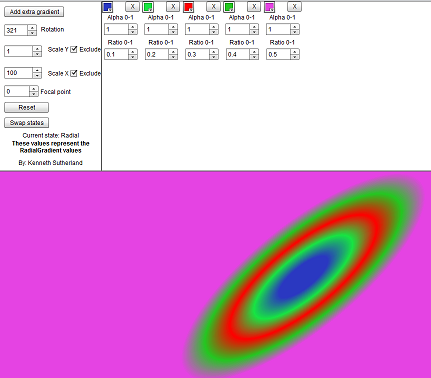
I was playing around with some code recently (Flex 4 code) and I went to create a simple background and not having Catalyst or similar to output a fxg file I went to create my own gradients with some code. After a couple of goes and not getting anything resembeling what I expect I decided to write a quick explorer.

I’ve done something similar ages ago with flex 3, so I thought I’d do this with flex 4 and perhaps look to expand it as an example of reskining an app with different skins. (source code may follow when I do this)  So here is the first step. A simple explorer to help understand the values that are used to make a Linear or Radial gradient along with the entries that make the look how they look.

I think it should be self explanatory, but if not just post a comment.

Follow the link to open the explorer.

Explorer screenshot

[ad name=”ad-1″]

Additional compiler arguments – debug only code

Additional compiler arguments – debug only code

Many times you look something up, do it once and think cool I’ll remember that as it’s simple. Then 1 year later you’ve forgotten the syntax and you can’t find that help/blog page where you learned about it the first time.
Well I needed to add in some debug code that would only be there for debugging, and the last thing I want to do when building a release version is to scan through the code to remove it. So the ideal way is to use a conditional compiler argument.

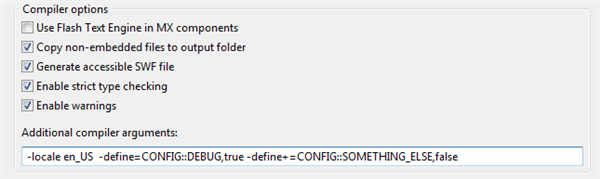
So in Flashbuilder, under the project properties and then the Flex compiler properties you’ll see something like this

Compiler Arguments
Example for custom arguments

So if you had the following defined, -define=CONFIG::DEBUG,true -define+=CONFIG::SOMETHING_ELSE,false

Then in code you could do the following.

    CONFIG::DEBUG
    private var test : Boolean;

    CONFIG::SOMETHING_ELSE
    private function somethingElse() : void
    {

    }

The variable and function code will only be included if the compiler argument is true. So in the above example if you called the function ‘somethingElse()’ then this would generate a build error as somethingElse() doesn’t exist. Change the argument to true and it will build fine.

[ad name=”ad-1″]

Simple tip #4 (GOTCHA) – Datagrid borders

Simple tip #4 (GOTCHA) – Datagrid borders

More of a gotcha than a simple tip.

I was customising a DataGrid with various skin parts the other day (Flex 3) and could I get the borderskin to show, heck no! Its been a while since I had to create a DG from scratch so I’d obviously blacked out any previous pain with using the dammed DG.

Anyway why would the borderskin not show? I tried a simple solid border, nope. I tried a custom png graphic taken from Fireworks for the DG’s border, nope. I tried a programmatic skin border and guess what nope – nothing.  The issue was that I had the background alpha set to 1 (which is pretty normal!) and I had set the alternate row colours.

Setting the background alpha to something less than 1 revealed the border so I ended up fudging it by creating the programmatic skin border by whatever the borderThickness is outside the size of the DG.  
So if the DG was meant to be 400px wide and borderThickness was 2, I made the DG 396px wide and drew the border outside that area.  This is what I’ve expect to happen automatically.

Can’t believe I’ve missed this/forgotten this before. Crappy DG.

Previous Tip

Next Tip

[ad name=”ad-1″]

Google, RSLs and indexing

Google, RSLs and indexing

A while back I posted an article on Google giving errors with indexing SWF files that used the RSL framework feature to reduce the overall size of your SWF. It seemed to me very odd that you have Adobe trying to push the use of RSL’s as well as bumming up the great work that they’ve done with Google to index SWFs but not mentioning that fact that Google couldn’t index a SWF with an RSL. This lead people to see errors when they tried to find their app in a Google search.  See this for details http://kennethsutherland.com/2009/04/27/google-and-swfs/

Anyway good news, finally Google can index SWF files with external resources.  This news came out a few days back, but due to my blog needing fixed (it was breaking FF – wordpresses fault:( ) and other things going on blah blah…

Well here is the annoucement from Google – http://googlewebmastercentral.blogspot.com/2009/06/flash-indexing-with-external-resource.html I have yet to try this out, but if it works as it say it does then great. another bonus for using Flex.

[ad name=”ad-1″]

Doom and gloom or a new beginning

Doom and gloom or a new beginning

Redundancy… world shrinking economy… depression… company cutbacks… is this a bleak time or is it a time to make and face new challenges in the RIA world (particularly in the Flex and Actionscript areas)?

Well after the unfortunate news that the company I work for are no longer wishing to partake in the RIA party that’s changing the way we look at and use the web/desktop and hence are making myself redundant. I’m looking at this as a great opportunity to expand my knowledge so that I can work with as many forward thinking companies as possible that deal with Flex/Actionscript/AIR or for that matter any RIA technology.
Also I should now have more time to create and sell my own components, of which I had a cracking idea this morning (more on this later hopefully).

Hect I’ll event look at Silverlight or JavaFX 🙂 if I get the time or the chance. So anyone out there fancy taking on a new contractor with 4 years+ experience in Flex as well as a bunch of other languages I’ve used along the way before I even heard of Flex.

Feel free to contact me at this address.
[kml_flashembed fversion=”10.0.22″ movie=”/flex/contact/Contact.swf” targetclass=”flashmovie” useexpressinstall=”true” publishmethod=”static” width=”300″ height=”50″]

Get Adobe Flash player

[/kml_flashembed]

I’m going to continue to post hints and tips on anything I do as well as posting any new components so watch this space and feel free to contact me if you need any work done in the UK, remote working is always an option as well.

[ad name=”ad-1″]